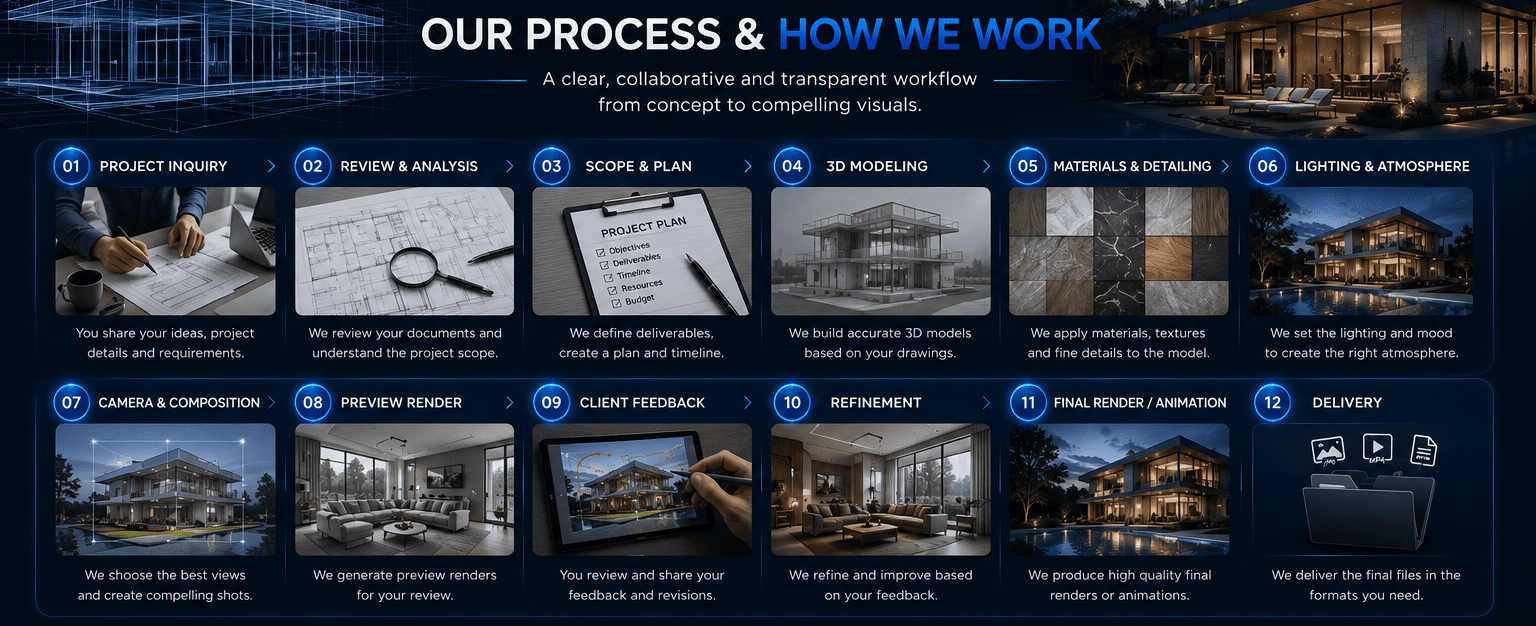
01 / 23Project Inquiry
Tell Us What You Want to Create
Everything begins with understanding your requirement. You can contact us even if you are not sure which specific service you need.
Tell Us
What you are working onWhat you want to visualizeWho the project is forWhat files you already haveHow many outputs you needWhere the visuals will be usedYour expected timeline
You Can Start With
A CAD drawingA PDFA floor planA sketchA photographA 3D modelTechnical drawingsA product conceptAn industrial processAn early-stage project description
Project & File Review
We Review What You Already Have
Once we receive the available project information, our team reviews it to understand the production requirements. Depending on the project, we may examine:
What We Examine
CAD drawingsFloor plansElevationsSectionsSite plans3D modelsBIM / model dataProduct drawingsEngineering informationPhotographsMaterial referencesMood boardsTechnical documents
We determine what information can be used directly and what may need additional work. The objective is simple: Understand what exists before deciding what needs to be built.
03 / 23Requirements & Scope Definition
We Define Exactly What Needs to Be Produced
Before production begins, we establish the project scope. This may include:
Visual Outputs
Exterior rendersInterior rendersFloor plansMaster plansProduct rendersTechnical visualsIndustrial visualsAnimationWalkthroughs
Production Requirements
3D modelingCAD draftingModel preparationMaterialsLightingLandscapingFurnitureEnvironmentAnimationPost-production
Delivery Requirements
Number of imagesVideo durationResolutionAspect ratioFile formatsIntended application
This stage prevents uncertainty later in the project.
04 / 23Project Planning
We Build the Production Roadmap
Once the scope is understood, the project is organized into appropriate production stages. A simple project may require only:
Model
→
Render
→
Review
→
Deliver
A larger project may require:
Technical Review
→
Modeling
→
Materials
→
Lighting
→
Camera
→
Preview
→
Revision
→
Final Rendering
→
Post-Production
→
Delivery
For large developments or industrial projects, production may be divided into separate phases.
05 / 23Project Scheduling
Establishing the Production Timeline
The project schedule depends on:
ComplexityNumber of deliverablesModeling requirementsAnimation requirementsTechnical requirementsRevision stagesClient feedbackFinal deadline
For larger projects, milestones can be established so both sides know when important stages are expected.
Project Start
↓
Model Development
↓
Preview
↓
Client Review
↓
Revision
↓
Final Production
↓
Quality Control
↓
Delivery
3D Modeling & CAD Preparation
Turning Project Information Into Production-Ready Data
Where required, we prepare the project for visualization. This may involve:
3D architectural modelingInterior modelingProduct modelingMachine modelingIndustrial environment modelingCAD draftingFloor-plan preparationModel cleanupGeometry refinementExisting-model modification
If the client already provides a suitable 3D model, we can evaluate whether it can be incorporated into the workflow. The goal: create a reliable digital representation of the project before visual production begins.
07 / 23Design & Technical Validation
Making Sure the Visual Represents the Supplied Information
Before moving deeply into visual production, relevant project information is checked against the supplied drawings, references or models. This can involve reviewing:
Building formFloor layoutsOpeningsMajor dimensionsRoom arrangementsProduct componentsMachine structureSite organizationMaterialsDesign references
For projects requiring professional architectural, engineering or regulatory approval, the responsible architect, engineer or other qualified professional remains responsible for the technical approval of the underlying design.
08 / 23Materials, Textures & Finishes
Giving the Model Its Visual Character
Once the geometry is prepared, materials and finishes can be developed. This may include:
ConcreteStoneWoodGlassMetalFabricFlooringWall finishesExterior materialsProduct surfacesIndustrial materials
Where the client has specified materials, we work from those references. Where materials have not been finalized, appropriate visual references can be discussed as part of the project direction.
09 / 23Environment & Context
Building the World Around the Project
Depending on the requirement, the visualization may include:
Architectural
LandscapingRoadsBuildingsParkingStreet elementsPeopleVehicles
Interior
FurnitureDecorative elementsLightingFixturesAccessories
Real Estate
Surrounding developmentAmenitiesLandscapeCommunity environment
Industrial
Factory environmentEquipmentProduction areasSupporting systems
The level of environmental detail depends on the intended visual and project scope.
10 / 23Lighting & Atmosphere
Creating the Desired Visual Experience
Lighting can dramatically change how a project is perceived. Depending on the design objective, we can develop:
Daylight scenesSunset scenesEvening scenesInterior lightingArchitectural lightingProduct studio lightingIndustrial lighting
Lighting is considered together with the architecture, materials, environment and intended presentation.
11 / 23Camera & Composition
Deciding What the Viewer Should See
For still renders and animation, camera selection is an important part of the process. We consider:
Viewing angleBuilding proportionsImportant architectural featuresInterior compositionProduct presentationViewer perspectiveMarketing objectives
For real estate projects, the camera may be positioned to emphasize the building's relationship with its surrounding environment. For product visualization, the camera may focus on form, detail and functionality.
12 / 23Preview Production
Before Final Rendering, We Create a Review Stage
For appropriate projects, a preview or draft stage allows the client to review the visual direction before final production. The preview can help establish:
CameraCompositionMajor materialsLighting directionEnvironmentModel accuracyOverall visual style
This stage is particularly useful for complex projects.
13 / 23Client Review
Your Feedback Becomes Part of the Production Process
The client reviews the agreed preview and provides feedback. Feedback may address:
CameraMaterialsColorsFurnitureLandscapingLightingEnvironmentProduct appearanceTechnical details
For efficient production, we recommend that clients consolidate feedback from their internal team before sending it to us.
14 / 23Revision & Refinement
We Refine the Approved Direction
After receiving feedback, the agreed revisions are incorporated. Our revision process is based on the project scope.
Minor Revisions May Include
Material adjustmentsColor changesSmall furniture changesLighting refinementsMinor environmental adjustments
Major Changes May Include
Significant redesignNew scenesMajor model reconstructionSubstantial camera changesNew deliverables
Major changes outside the agreed scope may require additional time or cost.
15 / 23Final Visual Production
Turning the Approved Scene Into the Final Output
Once the visual direction has been approved, the scene moves into final production. This may involve:
High-resolution renderingFinal lightingDetailed materialsEnvironmental refinementRendering passesImage processingAnimation renderingPost-production
The exact production process depends on the type of project.
16 / 23Post-Production
Final Visual Refinement
Where included in the project scope, post-production may be used to refine the final result. This can include adjustments to:
ExposureContrastColor balanceSkyEnvironmentAtmospheric effectsVisual detailsImage composition
The purpose is to ensure that the final image or sequence is ready for its intended application.
17 / 23Animation & Walkthrough Production
For Projects That Require Motion
Animation projects follow the same core workflow but include additional stages. Typical animation workflow:
Project Brief
↓
Model Preparation
↓
Storyboard / Sequence Planning
↓
Camera & Movement Planning
↓
Scene Development
↓
Animation Setup
↓
Preview
↓
Client Review
↓
Revision
↓
Final Rendering
↓
Post-Production
↓
Final Video
This can apply to:
Architectural walkthroughsFlythroughsProduct animationMachine animationIndustrial processesTechnical demonstrations
18 / 23Industrial & Machine Workflow
When the Project Explains a Process or Product
Industrial visualization requires an additional focus on technical understanding. We first identify:
What is the object?How is it assembled?How does it operate?Which components move?What process needs to be demonstrated?
Then the production can move through:
Technical Information
→
3D Modeling
→
Component Development
→
Process Planning
→
Animation
→
Technical Review
→
Final Visualization
Real Estate Project Workflow
From Development Plans to Marketing Visuals
For real estate developments, the workflow can be organized into multiple visual categories.
Development
Master Plan
↓
Buildings
↓
Landscape
↓
Amenities
Property
Exterior
↓
Interior
↓
Floor Plan
Marketing
Hero Images
↓
Lifestyle Visuals
↓
Walkthrough
↓
Marketing Deliverables
This allows a development to maintain visual consistency across multiple marketing assets.
20 / 23Quality Control
Every Final Deliverable Goes Through a Final Check
Before delivery, the final output can be checked against the agreed requirements. This can include:
Correct sceneCorrect cameraCorrect materialsMajor visible detailsImage resolutionAspect ratioFile formatAnimation durationOutput specifications
The objective is to make sure the final deliverables correspond with the agreed project scope.
21 / 23Final Approval
Client Approval Before Completion
Once final production is complete, the deliverables are provided for final review according to the agreed workflow. Where required, the client confirms that the deliverables meet the agreed requirements.
After final approval, additional changes may be treated as new or additional work depending on their nature.
22 / 23Delivery
Your Final Files Are Delivered Digitally
Final files are delivered using an agreed digital delivery method. Depending on the project, deliverables may include:
Images
JPGPNGTIFFOther agreed formats
Video
Agreed digital video formatAgreed resolutionAgreed aspect ratio
CAD / Technical
Agreed CAD or document formats
Source Files
Source/project files are provided only where specifically included or agreed
Project Completion
Closing the Project Properly
At completion, we confirm that the agreed deliverables have been provided. For ongoing or larger relationships, we can also discuss:
Additional project phasesAdditional visualizationNew propertiesNew productsFuture developmentsRecurring productionLong-term visualization support